Showing posts with label design. Show all posts

Thursday, January 5, 2012

Gooey Browser, Take 2.

Okay. I hope this post will be a bit more structured than the last (which wasn't really intended to be what it ended up being.).
As stated before, I have some lofty dreams for the future of my internet usage. But, like so many things, I have no intent of follow through, it is just a dream.

Anyway. Let's start with a list of things I want from my browser, and maybe a bit of why:

  1. The obvious, web browsing capabilities. I want to be able to navigate to/from websites quickly and easily. Best done, as proven, with a URL box.
  2. In-built search function. All the major browsers (which I classify as Chrome, IE and Firefox, though Safari and Opera can get put in if you prefer.) allow some kind of in-built search now. Type into you URL box and it will search if it is not set as a URL. I want this to be a customizable search engine, like Chrome. (Because I like Google. But some crazy people use Yahoo or Bing or whatevs. Not my issue.)
  3. I want interconnectivity between everything I do. That means one account to get into my browser, and I have access to my data/files/browsing history etc. wherever I am, whatever I am doing. This means using my browser as, basically, a computer account. It should be like logging into my PC. (Yup, this will become very like the Google Chromium OS)
  4. I want modifiable priorities. Person One may be a die-hard news junkie and wants twenty news feeds up all the time. Person Two might be a clean-cut music fan who wants just their browsing and music available. Etc.
  5. I want transparency and ease of use. If the browser is going to do something, it should be from my command, or from a set of instructions I have okayed. No downloading without consent, no preferences changed without consent, etc. (Again, rather basic and obvious.)
That's it. A small list, but rather lofty in places.
And the reason it is lofty, and only a dream at this point, is that it requires the internet (or at least every part that gets used) to play nice with one another.

Moving on.

So you open up your laptop, turn on your PC, whatevs. I'm not asking for insta-internet access like the Chromium OS. Don't really care if there is another OS. But it would be nice if it were unnecessary, or at least minimal. Turn that sucker on, open this. You got everything there as you want it. All visible, in fully customizable gel-pockets.

And what I mean by join hands is my #3 point. I want to log into my browser and I want to be logged in to everything I do.
Facebook? Opened in the social media ticker feed. Same with Twitter and Google Plus. (Plurk if you're into that.) In fact, everything that can give me a notification (other than email and RSS feeds) I want to open into the social ticker. That way I can drag that to my main browsing space and look through my everything all at once.
PMs from my forums, Facebook updates, tweets, missed IMs... All there. And constant updating, so when I have it minimised to the little carrel it will scroll along with it's new stuff.

I want my eamil (all of them. Personal, work, other) to be put into another carrel. Same idea here. I want constant updates. When something new comes in I want to drag it to my main browsing space (MBS for ease) and look at it, respond, make new ones, etc. Then throw it back into the carrel.

RSS/Reader/Tumblr and the like to their own bubble. New things in the same way, same functionality.

When in their carrels, these widgets will only show what they are told to (default to New Feed, but can be set to show a stable page/image/etc.).

I want my calendar in a tiny carrel. Look to your lower right screen (Windows). Where the date/time is? I want that to have full access to an interactive calendar (Possibly Google Calendar). Or in a larger one like you see on websites with the whole month available.

I want my music program of choice to sit in a carrel showing what I am listening to with controls all available on my screen.

I want all the standard necessities, word processor, spread sheets, slide-show, image editor, calculator, I want to be able to make databases too, or better sort functions in the spread sheet (either way) and I want them all available as widgets. That way I can throw one down into a carrel and make notes while reading an article. Do quick math while chatting with a friend. Collaborate with someone over video chat on the slide-show for work. Share a spreadsheet and reference it while writing without minimizing and maximizing windows all over the place.

I want share functions. If I am connected to a friend I want to be able to connect one of my carrels to a "sharing" carrel in their browser and have them see what I am doing in that carrel.

I want an in-built video chat that can be put in a carrel as well.

I want a note/comment function. Not only to make documents like above, but also to be able to write a note on a webpage and have that connection saved to my account. That way if/when I ever open that page again there is my note. "Read to this paragraph", "Use this quote", "Look this up"

I want my "Find it New" and "I Saw This".
Find it New, that is my StumbleUpon widget. It comes up with new things it thinks I would enjoy, and gives me things that might challenge me.
I Saw This lets me keep track of what I have seen or not, and whether I liked it. It also lets me tag those things with personal tags, as well as keep my likes organized. It is a bookmarking widget.

I want all my carrels and their configuration to be set up to suit how I use my screen.

I want multiple browsing spaces but I also want tabs.
Difference being if I change to a different browsing space, everything changes except the MBS. All my carrels are set up in another configuration (say, a 'clean' set, where there is only the time and the MBS), whereas a tab would be a subset of the MBS, and would only change within it.

And above all I want all these things to be directly linked to one account.
If someone sees my "profile", they will have access to everything (that I have allowed, of course.) No running from site to site trying to get an idea of who I am.

If I leave my profile public (or if you were a friend) you could pull it up and you would be able to see all of my activity. Browse the favourites I made available. See my updates. Go where I am and participate. Everything I liked or made or commented would be available in one place. (As I so choose, of course.)

Point being that every site would be part of this. There would be no need to log into Vi.sualize.us and look at my pictures. Any picture I liked there would be here, and vice-versa. No need to go to Facebook, you see all my social content here.

So I am not asking much. Just a total re-haul of the entire interconnectivity system that has been around since before I was born.
Unification.

I guess what I want is Google Chromium with a face-lift and the internet to all join hands.
That isn't too much, right?
Don't get me wrong, I'm not so crazy to think it would ever be possible. But I just wanted to tell you my dreams.

I know I said there would be pictures, too. That is not this post. There is one more on this topic, then I think we will be done.
Next post will be pictures and a quick overview of features and functionality of this imagined system.
Thanks for entertaining me. :)

Thursday, December 22, 2011

A Gooey Browser

Let me talk to you for a bit about my dream for the future of internets.
This is the first part, as there are many things I want to say, and the future part(s) will have pictures (yay) hand-drawn by me(ohmai).
Let us start with one thing thing, that would in the end be two.

My biggest issue with StumbleUpon is that there is no in-between, between thumbs up and thumbs down. And then that there is no way to sort the things I liked.
I want an all-around net experience, either in website or browser form (though browser would probably be more effective and powerful for what all I want from my prime internetting experience.)

I want something that can divide my screen into... lets call them carrels. Customizable configuration and number.
I can do this a bit with Windows 7 and browser tabs. But I want something a bit more... gooey... than that.

Honestly, the only reason I haven't pursued my idea for this thing any further than just wanting it (even with my limited coding and such knowledge) is that I can't think of any way to build a better tagging engine. At least, not without more people on board with a Dublin Core or similar metadata format. Because if no one does the front-end work of tagging things, or classifying them in some system (Dewey, anyone?), at our present level of AI, no computer is going to be able to automatically sort everything and apply tags accordingly.
That's why things stay hidden on Google, I suppose.

Anyway, the vision, I guess.
I want StumbleUpon's functionality, pulling up random sites
(though it would be nice to somehow get things not suggested by users. Truly random websites. That goes back to not having the AI to accurately determine site content. Can't have the program trying random strings of letters/numbers/etc. without some way to determine what it is looking at. (Though, if it were to do this as a subfunction, not directly in the line of use... Forming it's own bank of websites as well as suggestions... Hmm.) Though it would be nice to allow NSFW as a filter so you could 'stumble' porn only, if you were so inclined)
liking and disliking, but I want a third option of 'seen'. Because there are times when something gets pulled up on Stumble that is mildly interesting, so I wouldn't mind seeing more things like it (so I don't want to dislike it) but not so interesting that I want to keep it (so I don't want to like it) but I don't want it to come up again (since I've seen it.) So a third option allowing me to tell the program that I saw the website, and don't want it added to my likes or dislikes would be good.
I would say that I want it to mark every landed page as "seen", but there are times when I skip things on Stumble because it isn't loading well, because I don't have time to look at it long enough yet, or because I think I would like it to come up again sometime, as a surprise, I guess. So I wouldn't want it marked as seen.
Though perhaps something like Google Reader's "Mark Unread" would work instead. Eh.

Anyway. That would be one functionality.
I would also like the option to on-the-fly turn on/off NSFW content, videos, animations and content filters.
I also want a "Challenge Me" filter. StumbleUpon keeps track of what you like and dislike, and formats your experience to you. I once wrote a draft of a post (that never got posted) that touched this. Here is the video I really wanted to show you that explains it a bit:
I want a filter I can turn on that will show me things that fall outside of those bubbles. Just because I never "liked" anything about Prop 8 being shot down from the conservative perspective doesn't mean I don't want to read it. Or that I should never have a chance to be exposed. It would still only show me new things (unseen), but it would ignore the filters of what I've liked/disliked.

Added to these in-use functions, I want post-use functions. This is where I want to attach bookmarking functions to the StumbleUpon functions (as modified above).
PearlTrees is my bookmarking application of choice. It allows me to organize my favourites into, well, trees.
The desire to set my Tree up in Dewey classification is a constant battle between end-use and front-end work. So far the desire for less front-end work has won out.
Regardless, this is part of why I want a 'seen' button on StumbleUpon, for easier conversion to other areas.
I can't find things I've liked on StumbleUpon. I want to be able to categorize them, or have them categorized for me(preferably). That goes back to the top and AI being unreliable.
Yet I don't know how far I've gotten in transferring my 'likes' into pearls as if I remove the like from the item on SU, it will come up again when I go stumbling. And I can't favourite directly from SU to PearlTrees.
It would be nice to have user-end classification, or tags as well. Because a specific site may mean something specific to me, so I want to give it a tag that I can find it by (say, "showmum"). This shouldn't affect anyone else's classification, just mine, within my "browser".


Now, I'm going to snip this here, mainly because I don't feel I'm making much sense and want to draw up some diagrams and junk to clear my head in order to explain better, but also because I have only touched on two of the many things I want to go into the carrels, and this post would get quite long if I didn't.

Monday, May 23, 2011

Conlanging and you, part two!

Alright, after that crash course, I'm going to go through how I work with you. This will likely be long, so it'll probably get cut into more than one post.


I am one of those people that usually starts with a phonology, or a set of sounds that I want to put into a language. A basic idea of how I want it to sound. This usually means I start by saying a random sentence like thing out loud, then try to write it down using my dialect of English.

So something like "griskle neff twandr-ikka"
This has the plus (or minus depending on how you look) of only making sounds that I can pronounce available to me.
Another way I've done this is to pound my keyboard and try and pronounce what came up, adding vowels or word breaks where I just can't do it
" dgxfhcgvjhugbm "
becomes
"Dgzf hucgiv jhug bem"
Which I can pronounce (albeit rather haltingly).

A third way is to think of a language (or a couple, though more than three or four would get difficult) that you like the sound of, and mash them together, either by yourself, or through the use of a program to help you.
I used to have links to programs like these, but I rarely do things like this (read: once), so I've long since lost them. If you find one, will you throw it my way?

After I have something that sounds kinda how I want it, I'm going to use that to extrapolate.
I'm going to use my current language in process, Torete, to explain the following things. It will become a major fixture in these kinds of posts because it is my most complete work.

So I start with something that sounds kinda like this:
"ela fokomo de nena eska no fala make. ina feza salopa yutese"
Which, using XSAMPA, sounds almost exactly as it is written.
/el.a fo.ko.mo de ne.na es.ka no fa.la ma.ke i.na fe.za sa.lo.pa ju.te.se/

From there I notice that I have a great affinity for vowels, and I greatly despise consonant clusters. The only one that showed up was "sk" which is a cluster I find every easy to say.
So I decided that words in this language will have no consonant clusters, and that all words end in vowels.
I also get a good idea of what kind of word length I am looking at. I prefer four letter words.
I also prefer words that start with consonants. This leads me to say that words starting with a vowel are being modified in some way, a prefix.
It also gives me an idea of sounds I like:

/f k m d n s l z p y e i u a o/

From there I decided to look through IPA to see if there were any sounds that I don't have day-to-day exposure to that I would enjoy.
I mostly found them to sound too similar or to be unpronounceable, so I left it alone.
Splitting these up into vowels and consonants I have:

/a e i o u/
and
/f k m d n s l z p y/
I don't feel like that is enough, so I'm going to add
/b v r/ to the mix, as I like them too.

A quick way to see if you are getting words you like is to play with Awkwords. Their help button is really helpful, but I can answer some questions if you have them.


Okay, this is long enough. So.... To be continued. Likely tomorrow or the next day.

Sunday, May 22, 2011

Conlanging and you!

Alright, yesterday I explained through examples what a conlang can be at some of its highest peaks. If you're still with me you are likely insane or really bored. Both are acceptable.

You see these examples and think to yourself, hey, I want my own language! It'll be great for my book/my diary/confusing the hell out of teachers/profit/etc.!
While I give little hope to the last one, the others are a yes. Other neat things that can come from it are relieving boredom, procrastination, pure fun, the admiration of your peers(again, little hope), and gaining friends.

So let's get started, you yell. And I jump, because I startle easily.
Where, oh where to start when conlanging. It is different for a lot of people, some like to start with basic syntax, others have a random sketch of an intransitive verb combining with a noun in holy matrimony, still others start with a script, and a lot of people start with a phonology.

Wait, wait, wait. What? Intransi-whoey? Synta-what? Phrenology?

Okay, so I think it would be best to start at the top. Linguistics! Otherwise known as More Than Your Average High School English Class!

If you are groaning already and can't stand the thought of spending time on Grammar, then perhaps this is the wrong past-time. Maybe try cryptology? (Not to be confused with the science of crypts) (I hope to cover codes and ciphers another day, but for now that link should do)

So. Linguistics. Where to begin? Well, you certainly don't need a doctorate in it, but it would sure help. So if you think you can do it, go forth. I can wait.
No?
Okay. You don't need to know a lot of linguistics to start with, just a few basic terms and you should be rolling:

Phonology: Basically the set of sounds possible within a language. English allows "sss" "ch" and "sh", but does not allow "sch" (Unless it is "school" but that is more of a "sk") We also don't allow things like "ts" or "zx"

Morpheme: The smallest linguistic unit (word or word bit) that has definable meaning. Think "un-" "break" "-s" These are pieces we can tear out of other s=words and hold up as having meaning. I can break "break" into "br" and "eak" but neither has independent meaning, so are not morphemes.
Phone: the tiniest definable sound, such as one possible pronunciation of "b"

Phoneme: the smallest contrastive unit in the sound system of a language. So the entirety of possible pronunciations for "b", including "allophones" or sounds that all mean the same thing.

Syntax: The way that all the other things are put together to form coherent thoughts, the rules dictating order of things.

Parts of Speech: Noun, Article, Conjunction and a slew of others, you might want to get re-familiar with these.

The International Phonetic Alphabet (IPA): A set of letters based on the Latin alphabet that is intended to be used as a standard representation of all sounds used in spoken language (by anyone, anywhere).
Having at least the ability to know what the symbols are is a great start. Being able to move things back and forth with it is even better.

X-SAMPA: At the most basic, a way to use IPA using ASCII characters. I use it as I find it easier to remember.

Everything else is probably okay to learn as you come across it.

Ugh, that got long quick. Okay, splitting this into two for today.

Saturday, May 21, 2011

Other worlds, other languages

Remember how I apologised in advance for that rash of papermaking posts? The ones that never showed up? Yeah, I have a feeling this will be the same way, but just in case, I apologise for a rash of conlang/worlding posts to come.

Now that that is done, and I have a yummy banana ice lolly to eat, I thought I'd do a quick post about what I've been up to these last few days.

I'm a conlanger. Well, I prefer geofictionist...
A whosit? A whatsit?

If you don't already know, lemme throw some definitions at you. Stand still, this shouldn't hurt:

Conlang: A constructed language
Conlanger: A person who makes a constructed language
(Not to be confused with a canlang, or a Canadian language. Those are infinitely more frightening)
Geofiction: fictional worlds, geographic fiction
Geofictionist: A person who makes geographic fiction
Conworld: A constructed world
I'll let you figure out consports, conreligion, etc.


So yes, there, I've admitted to this oh so secret of vices. I know one other person, personally, that does it, along with a slew of internet folks, maybe two or three thousand as an upper guess (compiling all the numbers I know from a few forums and mailing lists, some of which are likely duplicated (like me!)), but I know there must be more lurking in the shadows.

So when you hear constructed language, what should you think of?

Well, think of Na'vi as a current example. The language spoken by the blue cat-people in Avatar? Yup. That's a constructed language. The people making that language hired a professor with a doctorate in linguistics to make a language for the movie. If you want to read more, wiki is a good start: Na'vi Language.

Want something a bit less current, but still alien? Reach only so far as Star Trek. The Klingons of that series have their own language which has become a major player in the field of conlangs. The language wasn't really intended, they mostly used nonsense "words" to get a feel of an alien tongue. But leave it to Trekkies to blow that up and out. Klingon is now a full fledged language with speakers around the world. You could even take classes at some point (This may still occur?) I unfortunately never really got into Star Trek, so my info is a bit dusty. However I have studied Klingon in a cursory manner, as it has structures similar to my conlang. You want to learn more, try the Klingon Language Institute.

So we want less current, but not alien. How about Tolkien? There's a reason that the secret vice quip was linked.
Tolkien made Elvish, and it seems that one reason he made the Lord of the Rings was to not seem crazy when putting forth the language. Neat, mm? Now Elvish I know as much of as anyone who never read the series (don't shoot!), but there are certainly a lot of resources about for it. So why don't we just direct you to the wiki, and you can put the knives down: Elvish Languages.

One more, then I swear I'll move on.

Esperanto. No, that's not some Spanish cowboy. It's a language developed by L. L. Zamenhof (Quite the mouthful, mm?) and his goal with this language was to have Esperanto be a politically neutral language spoken everywhere, allowing people of different nationalities to make an equal play towards peace.
A lofty goal.
And while it never reached that height (they don't teach you Esperanto in international business courses!) it is still the most widely spoken auxiliary language. There are 10,000 to two million fluent speakers, some of which are native speakers (that is, Esperanto is, or is one of, their first languages) Pretty big for something some guy just made up! Though, it has been around a while, the first book about it was published in 1887.
There is obviously tons of material about Esperanto out there, so I'mma leave you with just a Google search for Esperanto.


Now that you know a little bit about conlangs, I thought maybe I could share some information about how to go about making one, but I've kinda run out of space, plus you've probably wandered on to thinking about your dinner plans. That's okay, I ran out of ice lolly a paragraph and a half in, and I'm thinking about food too.

So I think I'll say:

ĝis la revido,
Qapla'
Mára mesta
kìyevame

or goodbye, in Esperanto, Klingon, Elvish and Na'vi respectively.

Sunday, May 8, 2011

A $25 computer?

Not quite.

The Raspberry Pi Foundation seems set on bringing one of my favourite movies to life. And thankfully not the previously mentioned eXistenZ.


No, they're going the way of The First $20 Million is Always the Hardest. In that movie they are trying to make the PC $99, a computer that costs less than a hundred dollars to make. Now, if that seems kinda familiar, you might want to remember the One Laptop Per Child company, the one making a full-on laptop and selling them near-cost for $100 to impoverished children?
Yeah, this is kinda like that.

The Raspberry Pi is a computer that costs approximately $25 and is hoped to be used to teach computer programming to children. The little thing has no monitor or keyboard, but instead has two ports, an HDMI and a USB: One to plug in an HDMI capable TV or monitor, the other to attach a USB keyboard. (Is it bad to feel old that I remember the keyboards that used headphone-esque jacks?)
The little stick then allows you to boot up Ubuntu or another open-source OS.

Anyway, I'm not a very computer-y person. If it isn't working I can give some suggestions to how to fix it, but the jargon that surrounds the field goes way over my head. So instead of just lyring the specs, I'll just link you to a few places that have more info, in case you are on of the more savvy among us:

And of course, the previously linked foundation website, Raspberry Pi.

So what does this mean? Hopefully it will help bring about change in the computer world, much like the One Laptop per Child did, and unobfuscate the way the computer is built and functions. Hopefully it will bring more power to the young and trodden upon in places that are in desperate need of change.

If nothing else, hopefully it'll help bring about some more savvy people, and create a trend for lower cost, high function machines in this world.

Friday, April 8, 2011

Something nifty of the day:

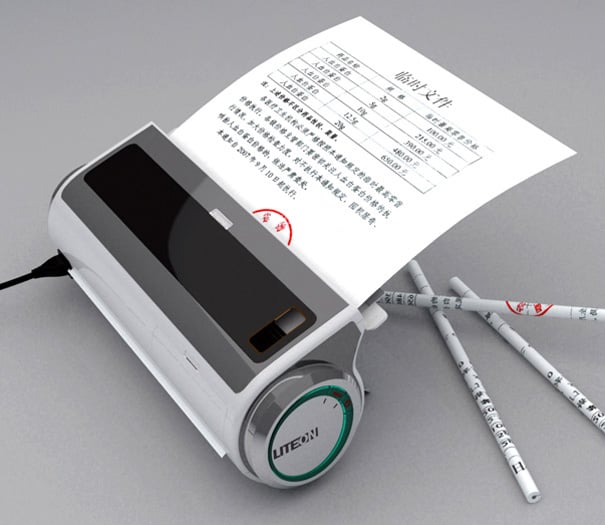
Look like a tiny and useless printer? Think again! This is a machine that turns paper into pencils. Yup. Just insert that bit of recycling into the slot and it will om-nom-nom it then poop out a neat little pencil. Not only that, it is also a pencil sharpener. -nodnod-

No word on if it is actually going into production or how much it is, but I predict that I'll never have one. But I wish I did!

Click through to read more: Yanko Deign